
Schedule the date your lessons open in your online school
Schedule lesson openings for the right time
The online school now lets you set a date and time for lessons to open automatically. You can schedule in advance when a student can start a particular lesson or test — no manual work on the day it opens.
Where the setting is
The feature is available in the LMS for online schools in two places. First set the school timezone: open the Settings menu → general settings section → School timezone field. It is used to calculate the opening date and time of scheduled lessons.
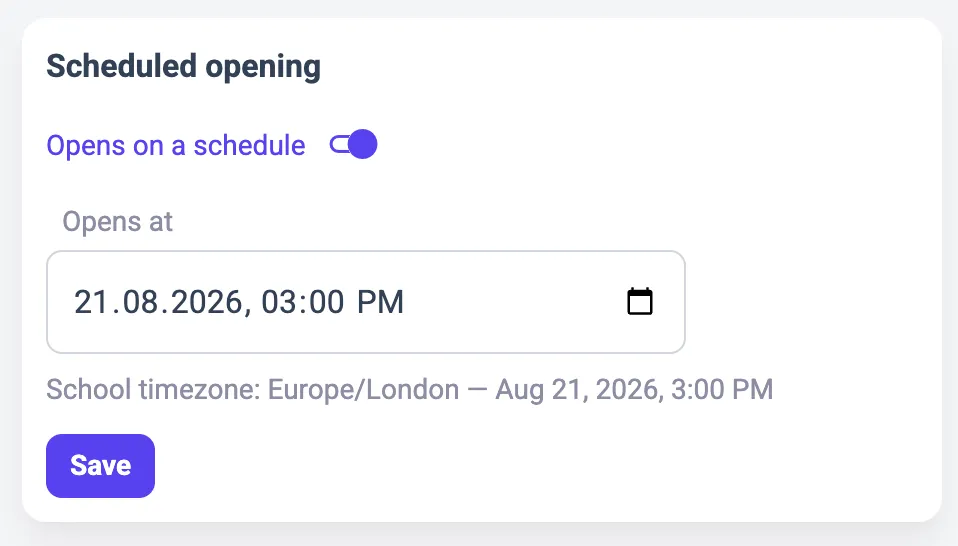
Then the course material editor now has a Scheduled opening block with the Opens on a schedule toggle. Switch it on, pick the date and time in the Opens at field, and click Save.
How it works
Until the set date, the student sees the Not available yet note and an “Opens at” message with the exact date in their timezone. Once the time comes, the lesson becomes available automatically. The opening date takes priority over the course sequential mode: when it is set, it determines a material’s availability.
Set the school timezone first, otherwise you cannot schedule a lesson opening date — the system will ask you to do it in Settings. If there were previously scheduled dates, they do not change when you switch the timezone, but they are displayed in the new timezone.